Codeer Agent Skill
The Codeer Agent Skill lets Codex or Claude Code help with the full Agent lifecycle: planning from KB files, creating behavior cases, diagnosing failed tests, reviewing production history, and proposing the next iteration before changes are applied.
The Skill does not replace the Codeer web UI. It gives your AI coding assistant a structured way to work with Codeer data and workflows while keeping changes reviewable.
CLI and Skill responsibilities
| Component | What it does |
|---|---|
| Codeer CLI | Local codeer command-line tool. It logs in to Codeer, connects to the API, and performs Agent, KB, behavior case, history, and evaluation operations. |
| Codeer Agent Skill | Instructions installed into Codex or Claude Code. It teaches the assistant how to work through the Agent lifecycle, when to discuss the plan first, and when to show proposed changes before applying them. |
What the Skill helps with
After installation, Codex or Claude Code can help you:
-
Plan and create Agent v0 from KB or files
- Start from documents, FAQs, SOPs, product data, or a folder.
- Discuss the Agent scope, knowledge boundary, and first version design before creating anything.
-
Generate behavior cases
- Create behavior categories, test cases, and scoring standards for the target scenarios.
- Make quality review concrete instead of relying on one-off conversations.
-
Diagnose failed cases
- A failed case does not always mean the prompt is wrong.
- The issue may be in the KB, Agent instructions, retrieval behavior, standard, or rubric.
-
Analyze production history and negative feedback
- Review real conversations and bad feedback to find repeated patterns, missing coverage, and high-risk scenarios.
-
Prepare the next iteration
- Summarize evidence, propose the smallest useful fix, preview what would change, and ask for confirmation before applying or publishing changes.
Step 1: Create an Admin API key
Use an Admin API key from the target workspace. The Skill uses the CLI for Agent, KB, behavior case, history, and evaluation work, so the first setup should use an Admin-level workspace key.
- Open the target workspace.
- Open
API Keysfrom the left sidebar. - Select
Issue New Key.
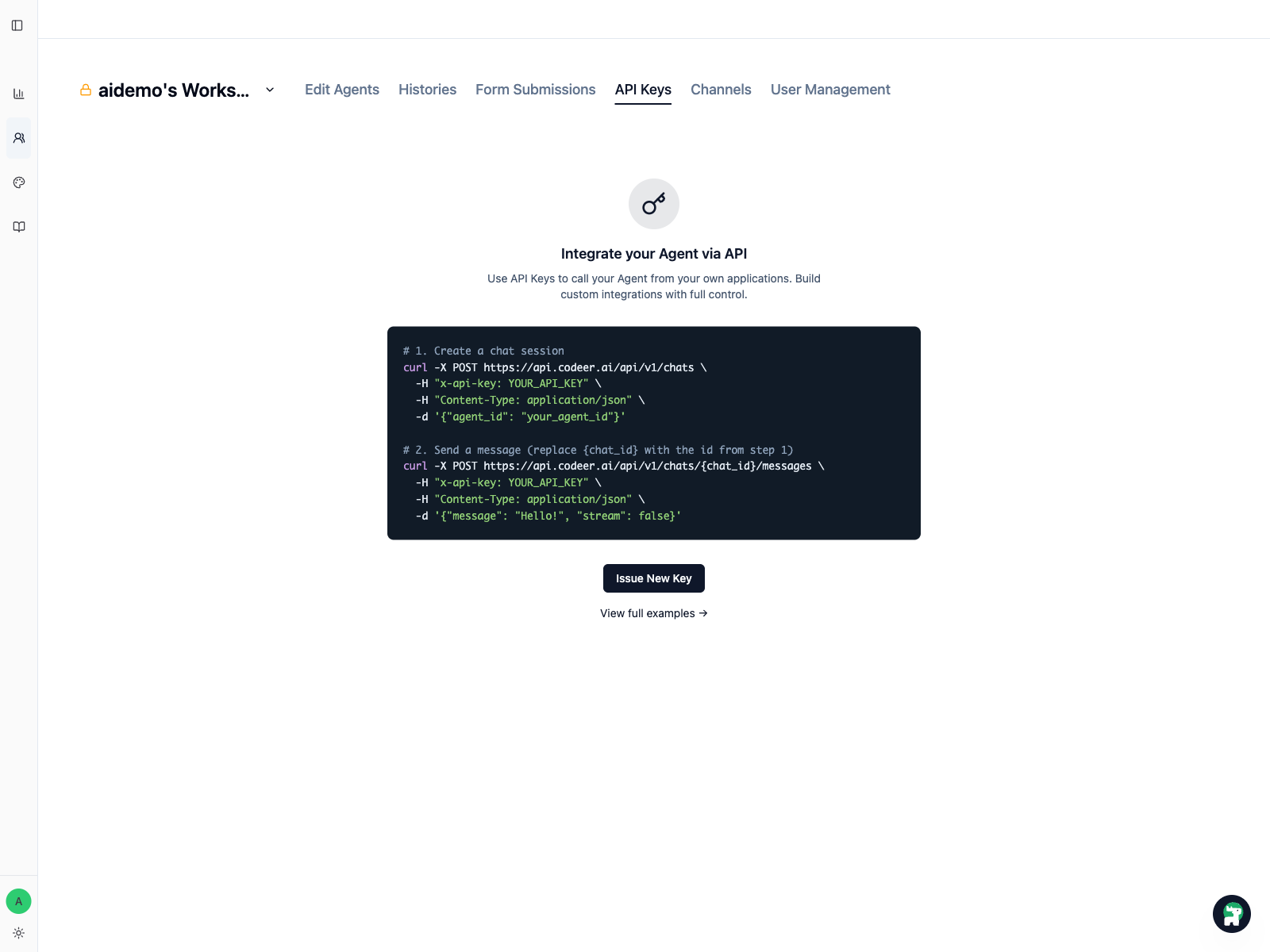
When creating the key:
- Use a recognizable name, such as
CodexorClaude Code. - Set the access level to
Admin. - Copy the full API key immediately.
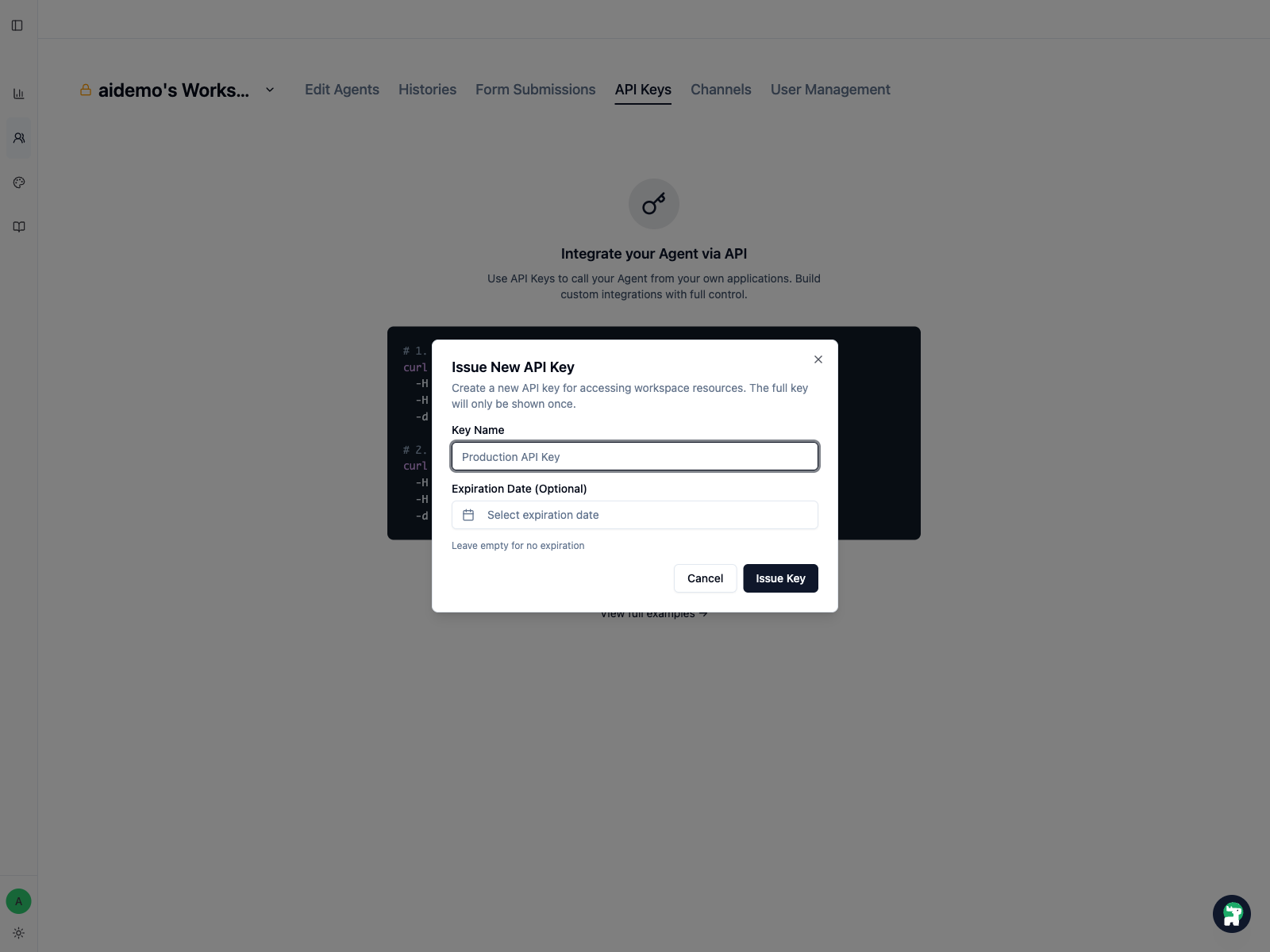
The full API key is only shown once
Save the key in a secure place immediately. Do not paste it into chat, prompts, Git repositories, project .env files, or .claude/settings.json.
Step 2: Install the Codeer CLI
The Skill works through the local codeer CLI. We recommend installing it with pipx so it stays separate from project Python environments.
pipx install codeer-cli
Confirm the command is available:
codeer --help
If you do not have pipx yet:
python -m pip install --user pipx
python -m pipx ensurepath
Restart your terminal, then run:
pipx install codeer-cli
For maintenance:
pipx upgrade codeer-cli
codeer check
Use project Python installs only as a fallback
python -m pip install codeer-cli can work as a fallback, but pipx is safer because it is less likely to be affected by project package versions.
Step 3: Configure a local CLI profile
The profile stores the API key in user-level Codeer CLI config. You do not need to put the key into Codex or Claude Code settings.
work is only an example profile name. You can use codeer, prod, client-a, or another name that is easy to recognize.
codeer profile add work
codeer profile use work
Use the same profile name in both commands if you choose a different name.
Check that the CLI and credential work:
codeer check
codeer agent list
This confirms that the CLI and API credential are working. It does not confirm that the Skill is loaded.
If the project has one default Agent, you can optionally set:
export CODEER_AGENT_ID=<agent-id>
Do not store CODEER_API_KEY in .claude/settings.json, project .env files, chat messages, or Git commits.
Step 4: Install the Codeer Agent Skill
Install the codeer-agent folder from the public GitHub repository. Use the folder URL, not the repository root:
https://github.com/codeer-ai/codeer-skills/tree/main/codeer-agent
For Claude Code, install the Skill into your personal skills folder:
git clone https://github.com/codeer-ai/codeer-skills.git
mkdir -p ~/.claude/skills
cp -R codeer-skills/codeer-agent ~/.claude/skills/codeer-agent
For Codex, ask Codex to install the Skill:
$skill-installer install https://github.com/codeer-ai/codeer-skills/tree/main/codeer-agent
If the Skill does not appear after installation, restart Codex or Claude Code.
Step 5: Verify the Skill is loaded
Ask Codex or Claude Code:
Please confirm whether the Codeer Agent Skill is loaded. Explain how you can help me plan an Agent from KB/files, create behavior cases, analyze production history, and show me proposed changes before applying them.
The ideal answer should mention:
- Agent lifecycle
- Behavior Cases
- Production History
- asking for confirmation before creating, updating, or publishing Codeer resources
How the Skill should collaborate with you
The Skill is meant to split Agent improvement into discussable, reviewable steps:
- It first understands your goal, data sources, and current Agent state, then proposes a working order.
- Before creating or changing Agents, KB, behavior cases, or rubrics, it explains what it plans to do.
- Before applying changes, it shows a preview or a before-and-after diff.
- Before publishing a new Agent version, it confirms that test results, failure analysis, and proposed changes have been reviewed.
Troubleshooting
| Problem | What to check |
|---|---|
codeer: command not found |
Run pipx ensurepath, restart the terminal, and try again. |
codeer check shows 401 or 403 |
The API key may be expired, revoked, or missing Admin access. Create a new Admin workspace key and update the profile. |
| Wrong workspace appears | The active profile probably uses another workspace key. Switch to the correct profile, then run codeer check. |
| Agent not found | Confirm that CODEER_AGENT_ID belongs to the same workspace. If unsure, unset it and run codeer agent list. |
What to do after installation
Use the prompt that matches your current state:
- If you do not have an Agent yet:
These are my KB files. Please discuss what Agent v0 we should create, what data it needs, and where the risk boundaries are. - If you have an Agent but no behavior cases:
Please design behavior categories, cases, and rubrics for this Agent's job. Let me review them before applying. - If some behavior cases are failing:
Please analyze whether the issue is in the KB, Agent instructions, retrieval, standard, or rubric, and show me the proposed changes first. - If the Agent is already live:
Please analyze Production History and Negative Feedback to find repeated failure patterns, missing test coverage, and the highest-priority next fixes. - If you are starting the next iteration:
Please propose the next version plan based on current issues, test results, and history. Show me the evidence and proposed changes before applying or publishing.