Call Agent
Use Call Agent when another agent already has a clearer, narrower job than the current agent should carry by itself.
For the Consultation Desk example, the front-door agent handles clarification and recommendation. Once the user is clearly ready for booking or callback routing, it can hand off to Scheduling Desk instead of trying to do both jobs in one prompt.
When Call Agent Is Worth It
Use it when:
- One part of the workflow has a different specialty
- The handoff boundary is easy to explain
- Reusing an existing agent is cleaner than copying its logic
Do not use it when:
- The target agent is barely different from the caller
- The split is only cosmetic
- You cannot explain when the handoff should happen
Step 1: Publish the Target Agent First
Before you add the tool, create the specialist agent and publish at least one version.
In this example:
Consultation Deskstays the expert front doorScheduling Deskhandles booking or callback routing
No published version means no safe handoff
If the target agent has never been published, the operator has not established a stable version to call. Publish the specialist agent first, then add it as a tool.
Step 2: Add the Specialist Agent
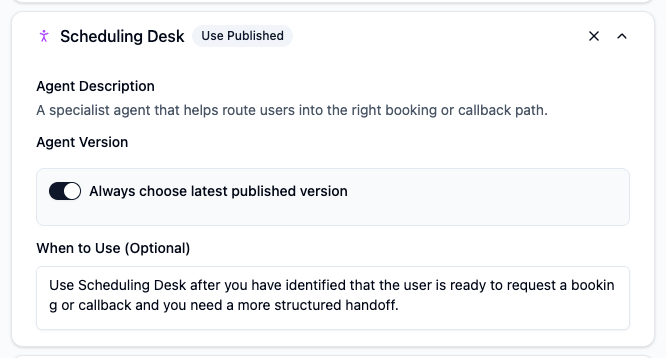
In Editor, open Tools, click Add Tool, then choose the target agent under Agent Tools.
Step 3: Choose Version Strategy
You have two practical choices:
| Version mode | Use it when |
|---|---|
| Always choose latest published version | The specialist agent is still improving and you want the caller to follow the newest published version automatically |
| Fixed version | You need a stable, predictable handoff target and want to control upgrades deliberately |
For most operators, Always choose latest published version is the right default during iteration. Move to a fixed version only when stability matters more than speed of change.
Step 4: Write the Handoff Rule
Tell the main agent exactly when it should call the specialist.
Example:
Use Scheduling Desk after you have identified that the user is ready to request a booking or callback and you need a more structured handoff.
That rule works because it defines the handoff moment clearly.
Step 5: Test the Boundary
Test with prompts that should cross the boundary.
Examples:
I think I need someone to call me back tomorrow afternoon.I am ready to book. What should I do next?
Then confirm:
- The main agent does the clarification first
- The handoff happens only after the route is clear
- The answer does not duplicate both agents doing the same job
Operator Tips
- Keep the specialist agent narrow. The more focused it is, the easier the handoff is to trust.
- Name the target agent by its actual job, not a vague internal label.
- Explain the boundary in both the caller's
Instructionsand the tool'sWhen to Use. - If the specialist changes often, keep the caller on
latest published versionuntil the workflow stabilizes.
Platform Behavior to Know
- You can add up to
5Call Agenttools per agent. - Tool calls run sequentially.
- Called agents do not keep calling other agents recursively as a deep chain.