Agent Editor
Agent Editor is where operators do the real day-to-day work on an agent. You do not need to master every control at once. For most improvements, you will repeat the same loop inside one screen: update the agent, test the change, save a version, and move on.
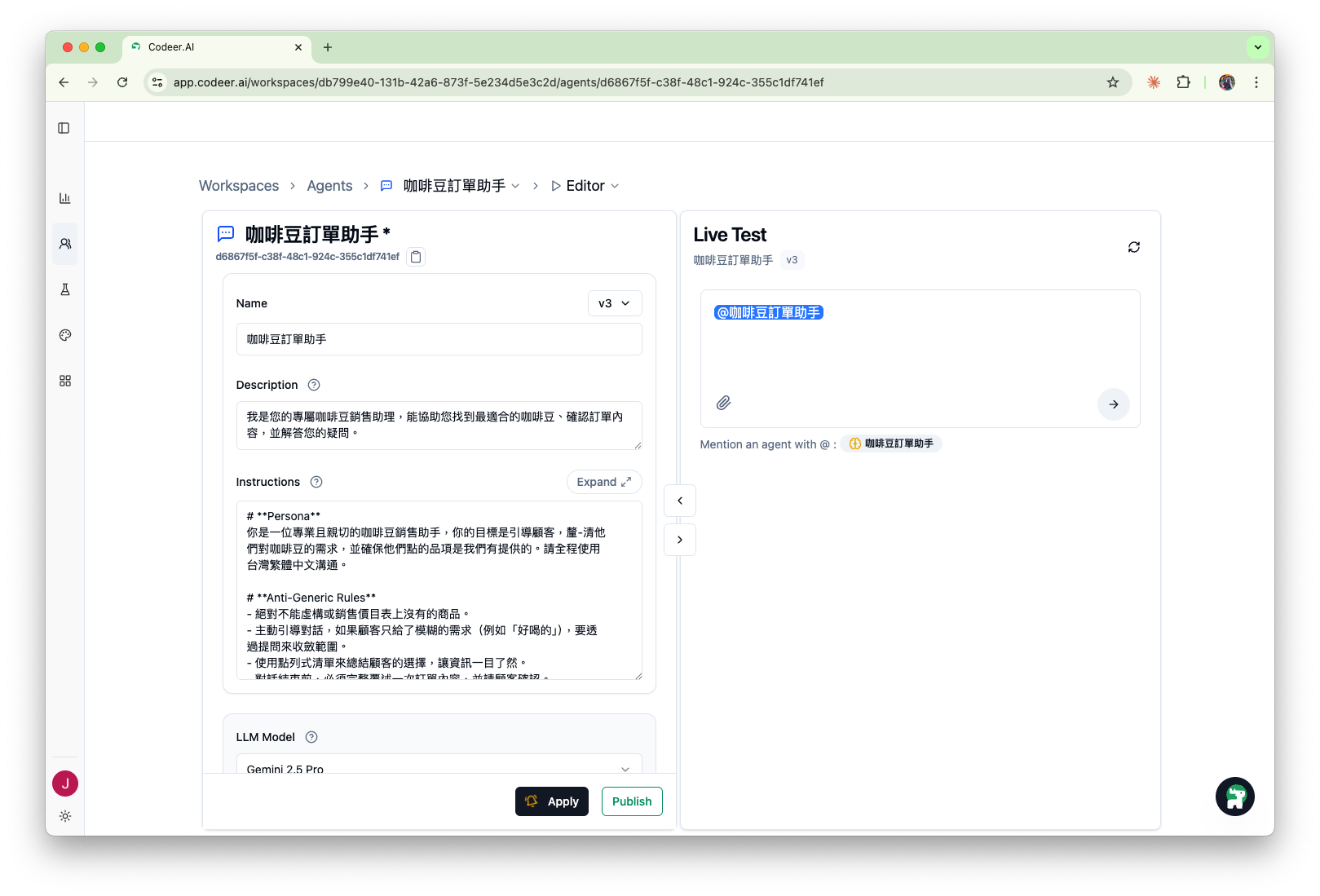
Why this screenshot already looks active
The example agent is already live, so you can see the full working state in one image. A brand-new agent starts with the same fields, but Live Test becomes useful after you add the first working version.
The operator loop inside the editor
For Consultation Desk, the usual sequence is:
- Use a Template or the editor to create the first working version.
- Try the exact behavior in
Live Test. - If the response misses the mark, tell
Copilotwhat you expected and let it propose a focused change. - Review the proposal and click
Applyto save a new working version. - Publish the version only after the behavior is good enough for real users.
What matters most on day one
You can ignore many settings at first. Start with these:
Name: what your team calls the agentDescription: one sentence describing the job it doesInstructions: the operating rules that matter mostLive Test: the fastest way to see whether the current version behaves correctly
For the Consultation Desk example, the minimum useful version is simple:
- ask clarifying questions before recommending anything
- choose only one allowed next step
- avoid invented prices, services, or guarantees
- hand off when the situation is risky or unclear
Use the editor like an operator, not a form filler
When you open the editor, do not try to perfect every field before testing. A better pattern is:
- Write or generate a first instruction draft.
- Test one realistic prompt in
Live Test. - Fix the specific failure you just saw.
- Save that improvement with
Apply.
This keeps the work tied to observed behavior instead of abstract preferences.
Where Copilot fits
The Copilot button remains available in the lower-right corner, but it does not interrupt Agent creation. After your first Live Test, Agent Editor introduces it as the next step when a response needs improvement.
Copilot can see the current Live Test conversation and Agent settings. Tell it what missed the mark and what you expected, then use it to:
- connect the observed failure to the relevant instruction, knowledge, tool, or boundary
- ask focused follow-up questions about missing decision points and handoff rules
- suggest what should live in
Instructions,Knowledge Base, orWeb Search - propose a change for you to review before applying it
The instruction workflow is covered in Instructions.
Where Live Test fits
The right side of the screen is not just a demo panel. It is the fastest quality check you have before a stakeholder sees the change.
Use Live Test to confirm that the agent:
- asks the right follow-up questions
- stays within the allowed outcomes
- explains the recommendation clearly
- stops and hands off when it should
If the test fails, describe the mismatch to Copilot or adjust the agent directly, then run the same test again.
Apply and Publish are not the same
Applysaves a new working version of the agent.Publishmoves a version to the public experience used by channels.
That split matters. Operators should save often with Apply, then publish only the version they are willing to stand behind.
The details are covered in Version Management and the beginner publishing flow in Share for Feedback.
What to leave for later
Once the core behavior works, you can decide whether the agent also needs:
- Tool Configuration for connected data or actions
Output presentationto let the agent add visual components after its normal text answer- suggested questions for a cleaner starting experience
Use Advanced settings for a specific operating need
The Advanced section contains secondary controls. Leave them at their defaults until a real requirement or failed test gives you a reason to change them.
| Setting | What it changes | Decision boundary |
|---|---|---|
Model Settings |
Temperature, Max Tokens, Top P, and Thinking Level for the selected model | Change one setting at a time and rerun the same cases. See LLM Model Selection. |
Attachments |
Adds up to five files to every Agent request | Use for a small, stable reference that must always travel with the request. Use Knowledge Base for a larger or changing source collection. |
Suggested Questions |
Shows up to three clickable conversation starters in supported client experiences | Use questions that demonstrate the published scope; do not suggest work the Agent has not been verified to handle. |
Response mode |
Chooses whether AI answers external messages or every message waits for a person | See Human Handoff for the difference between AI replies, Human replies only, and conditional handoff. |
Identify the Agent when AI takes over
Use the optional AI takeover greeting in Advanced when customers should know that AI is answering. Save the change with Apply, then publish that version. Leave it blank to omit the greeting.
The greeting is added verbatim, followed by a blank line, to the first text answer when AI begins replying or resumes after human handling, including a handoff timeout. It is part of that answer, not a separate message sent immediately when you change modes. If the Agent only returns a card or image, the greeting waits for a later text answer. It does not repeat while AI continues handling the conversation, including across a new session in the same AI period.
Verify the result through a customer Channel after publishing; Live Test is not a check of this customer-facing takeover behavior.
When to use Output presentation
Output presentation controls whether the agent may add structured visual components after its normal text answer.
Use it when a LINE experience would be clearer with a limited visual format, such as:
- verified source citations
- option cards or carousels
- image galleries
- action panels with URL buttons
- compact lists
- ordered timelines
- location carousels
Output presentations are not a substitute for the answer itself. The agent should still write the text response first. Verified citations use server-checked source references, but cards, galleries, lists, timelines, locations, and action panels are model-organized presentation.
Current channel support
Output presentation components currently display only on LINE. Other channels keep the text answer without these visual components.
Next Steps
- Instructions to sharpen the agent's rules
- Version Management to save and publish safely
- Review Feedback and Update the Agent to work from real conversations