Tool Configuration
Tools help an agent do real work with less mental effort per reply. Add them when a verified scenario shows that instructions alone are not enough to keep the agent accurate, consistent, or efficient.
Tools are not the starting point. The starting point is a clear first scenario set. Add a tool only when you can point to a repeated job the agent should handle more reliably:
- Look up stable reference material
- Query exact rows or calculate results from tabular data
- Check the latest public information
- Create a new visual from a text description
- Turn a stable text answer into spoken audio
- Hand off to a more specialized agent
- Collect structured intake details
- Send or fetch structured data from another system
- Request payment before the next step continues
- Remember stable user preferences across conversations
Start with the job, not the menu
Use this decision order:
-
Does the agent need stable reference material that should stay consistent across conversations?
- Use Knowledge Base for reference material the agent should search when relevant.
-
Does the agent need exact rows, filters, sorting, or calculations from a CSV, XLSX workbook, or Google Sheet?
- Keep ready tabular sources in the configured
Knowledge Basewhen the agent should discover the relevant table automatically. - Use an explicit Tabular Data Tool when the source must stay fixed and predictable.
- Keep ready tabular sources in the configured
-
Does the agent need the latest public information?
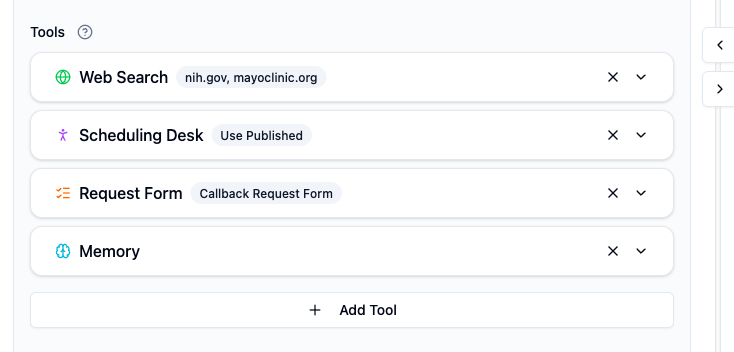
- Use Web Search, usually with trusted domains.
-
Does the agent need to create a new visual during the conversation?
- Use Image Generation when the user needs an illustration, concept image, or simple mockup generated from text.
-
Does the user need to hear the answer instead of only reading it?
- Use Text to Speech when a stable answer should be delivered as spoken audio.
-
Does another agent already do one part of the workflow better?
- Use Call Agent to hand that part off.
-
Do you need the user to provide information in a clean structure?
- Use Request Form after the conversation reaches that stage.
-
Does the agent need to send or fetch structured data from another system during the conversation?
- Use HTTP Request only for a narrow business action, such as creating a callback lead or checking availability.
-
Does the next step require an approved payment before it can continue?
- Use Payment when the service, price, and next step are already approved.
-
Do you need to remember stable user preferences across future conversations?
- Use Memory with narrow rules about what is safe to store.
Keep the first version small
Start with the fewest tools needed for the first verified scenarios. Add the next tool only when a failed case or production pattern shows a different problem that instructions cannot solve cleanly.
The Main Tools in This Section
| Tool | Use it when | Do not use it for |
|---|---|---|
| Knowledge Base | The agent needs stable documents, SOPs, policies, FAQs, or reference notes | Live external information |
| Tabular Data Tool | Exact tabular queries must use a fixed, explicitly selected source | Automatic source selection, document search, cross-table joins, or modifying the source |
| Web Search | The user explicitly needs the latest public information | Replacing your own product or policy knowledge |
| Image Generation | The user needs a brand-new image, concept visual, or simple mockup generated from text | Replacing approved source assets or exact final design work |
| Text to Speech | The user needs a stable answer delivered as spoken audio | Making every reply audio or reading out sensitive details |
| Call Agent | Another agent has a clearer, narrower specialty | Splitting a simple task just because the tool exists |
| Request Form | You need structured intake after the next step is clear | Opening every conversation with a form |
| HTTP Request | The agent needs to send or fetch structured data through an external API | Vague “do anything” integrations without a stable contract |
| Payment | The user must complete an approved payment before the next step continues | Inventing prices, bundles, guarantees, or unapproved offers |
| Memory | You need stable, user-confirmed preferences later | Sensitive details, one-time notes, or secrets |
Open the Tool Picker
In Editor, scroll to Tools and click Add Tool. The picker shows what is currently available in the workspace.
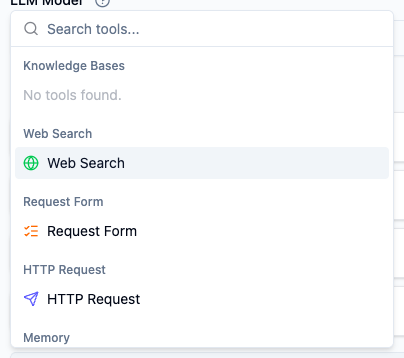
Some options stay disabled until their prerequisites exist:
Knowledge Basesstays unavailable until the workspace has at least one usable knowledge folder or file.- Automatic tabular discovery needs a ready CSV, XLSX, or Google Sheets source in the agent's configured Knowledge Base and no explicit
Tabular Data Tool. - An explicit
Tabular Data Toolneeds one ready source. Adding any explicit tabular tool disables automatic discovery for that agent. Agent Toolsstays unavailable until another agent exists and has a published version you can safely call.Text to Speechneeds available speech models and voices from the configured provider before it can be tested end to end.Paymentneeds a workspace payment account before it can complete real payment requests.Memoryis limited to one per agent.
Write Better When to Use Instructions
Most tool mistakes are not product bugs. They come from vague invocation guidance.
Strong When to Use instructions:
- Describe a real user request
- Make the trigger narrow enough to avoid unnecessary tool calls
- Explain priority when more than one source could answer
Weak:
Use this tool when needed.
Strong:
Use this knowledge base when the user asks about consultation types, routing rules, or handoff expectations that should stay consistent across conversations.
Strong:
Only use Web Search when the user explicitly asks for the latest public guidance, and prefer official or medically reviewed sources before answering.
Tool Limits and Operator Habits
- Total tools per agent:
10 - Maximum
Call Agenttools:5 - Maximum
Memorytools:1 - Tools run sequentially, so every extra tool increases the chance of a slower or less predictable path
In practice, a small, opinionated tool setup is easier to debug than a large one.
Add tools as scenarios require them
For a simple customer service agent, a practical first stack might be much smaller than the full menu:
Knowledge Basefor the approved policy or service facts needed by the first scenarios- automatic tabular discovery through
Knowledge Basewhen those scenarios require exact queries or calculations from a relevant ready table - an explicit
Tabular Data Toolonly when the source must stay fixed Request Formif boundary scenarios should collect structured details instead of continuing in chatHTTP Request,Payment,Call Agent, orMemoryonly when a verified scenario needs that action
You do not need every tool on day one. Add them in the order your testing shows they are needed.