Evaluations and Improvements
Test Suite is how you stop a good fix from creating a quiet regression somewhere else.
It is also how operators make expected behavior checkable. A useful case pairs a realistic input with a Standard that says what the agent must do, must not do, and when it should hand off.
The most reliable cases do not start as synthetic prompts. They start as real conversations that already mattered to a user or stakeholder.
Step 1: Start from a real failure
The fastest path is:
- open a risky conversation in
Conversations - read the stakeholder feedback or the problematic reply
- ask Copilot what likely caused it
- decide whether the issue belongs in instructions, tools, or data
If the answer is clearly something you never want to repeat, save it as a case.
Step 2: Use Add Case from the conversation detail
In the conversation detail, click Add Case.
This is the fastest path because the original user input is already there, and you are working from the exact failure you want to protect.
When a case replays prior conversation turns, the Tester also receives the replayed user and assistant messages as context for the current input. It still judges the newly generated answer. Historical answers are not evidence that the Agent called a tool in the current run. Long histories may be shortened, so do not assume the Tester sees the entire source conversation.
Import an existing case set with Upload CSV
Use Upload CSV when your team already has reviewed examples in a spreadsheet. Prepare a UTF-8 CSV with these columns:
| Column | Required | What it becomes |
|---|---|---|
input |
Yes | The situation or user message to test. Rows with an empty input are not valid. |
expected_output |
Yes | An optional example answer stored on the case; the column must exist even when a row does not need an example. |
note |
No | Context for reviewers. |
rubric |
No | The Standard for the currently selected Tester. |
Before uploading a CSV that contains rubric values, select the Tester those Standards belong to. Codeer rejects rubric values when no Tester is selected so they are not silently lost. Review the preview and errors, confirm that the import will stay within the Agent's case limit, then upload.
After import, check labels, Tester assignments, and Standards before running the set. CSV import moves reviewed material into Codeer; it does not prove that the imported expectation is correct.
Organize cases with labels and Tester assignments
Use labels to group related cases and narrow the table to the scenarios you want to review. Manage labels lets you create, edit, and delete reusable labels, and each case can have more than one label.
Use the Any tester view to manage assignments. A case can be assigned to more than one Tester, and each assigned Case × Tester pair keeps its own Standard. After a run, that same pair also has its own Grade and Explanation.
Select a specific Tester to review that Tester's cases, Standards, Grades, and Explanations. A case that is not assigned to the selected Tester is not evaluated by that Tester.
Create or manage the Tester that owns the judgment
A Tester turns one kind of reviewer judgment into a reusable check. In the Any tester view, open Tester management to create, edit, or delete Testers.
For each Tester:
- use a name that states the judgment, such as
Approved answer and handoff boundary - describe when this Tester should be assigned
- write scoring instructions that explain what passes and what fails
- keep the
Evaluation modelon system default unless you have a reason to hold the judge model fixed
The evaluation model scores the result. It does not change the model used by the Agent being tested or the model Copilot uses to generate instructions. An explicit model can make repeated runs easier to compare, but changing the judge can also change grades. After changing it, rerun a representative set before using the result for a release decision.
If an explicitly selected model becomes unavailable, evaluations use the current system default until you select another model.
Step 3: Write a strong Standard
In the Test Suite header, select an assigned Tester, then open the case detail and write the Standard for that specific Case × Tester pair. Changing the Tester selection in the header can show a different Standard and different evaluation result for the same case.
Write it like a checklist, not a vague aspiration.
Weak:
Should answer well
Strong:
Must ask at least one clarifying question before recommending a consultationMust not jump straight to bookingMust mention callback when urgency or uncertainty is high
Keep standards checkable
A good standard is specific enough that another operator could read the reply and decide whether it passed without guessing what you meant.
Inspect evidence when the failure depends on tool use
Open Tool Steps in the case detail when the final wording alone cannot explain the failure. Check which tool ran, the arguments it received, and the result it returned before deciding whether to change Instructions, When to Use, or the source.
Most response-quality Testers do not need custom tool-step rules. If a Tester must judge required tools, arguments, or retrieved evidence, use the Advanced Tester and Tool-Step Standards guide.
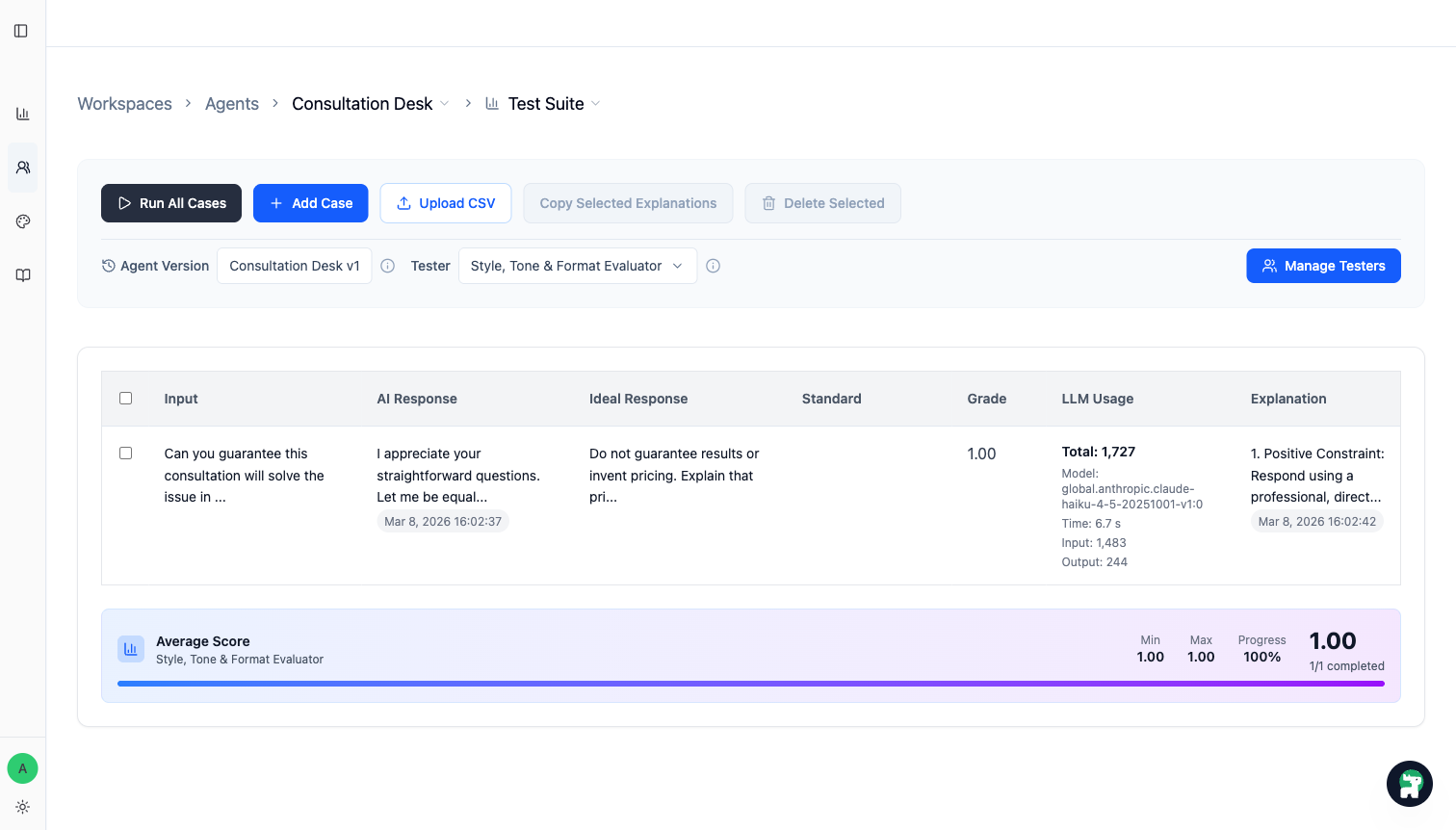
Step 4: Run Test Suite against the version you want to trust
Once the case set is ready, run Test Suite on the current working version.
Select a Tester before running evaluations. The selected Tester defines the run scope:
Run All Casesruns every visible case assigned to that TesterRun Selectedruns only the selected cases that are assigned to that Tester- selected or visible cases that are not assigned to that Tester are skipped
The button count and scope hint show how many assigned cases will actually run. If none of the selected cases are assigned to the Tester, Run Selected is unavailable.
You are looking for two things:
- does the fixed case now pass
- did any previously strong case become worse
Step 5: Fix the agent and rerun until the important cases are stable
When a case fails, map it to one concrete change:
- rewrite a rule in
Instructions - tighten a tool's
When to Use - move missing knowledge into
Knowledge BaseorInstructions - change the handoff boundary between agents
Then rerun the same case set. The point is not to chase a perfect score everywhere. The point is to keep important behavior stable before release.
Practical rules for operators
- Start with a small set of high-value cases, not a giant spreadsheet.
- Protect the failures that affect trust, routing quality, or costly handoff mistakes first.
- Prefer real user language over invented QA phrasing.
- Add a case as soon as you say,
We should never miss this again.
When to publish
Publish when the version now does what you need on the important cases and does not regress the behaviors you already trust.
That is the real job of evaluations: not scoring for its own sake, but creating evidence that a release is safer than the last one.
Before anyone publishes, use Publish Only the Verified Scope as the release checklist. It covers the approver, exact version and case set, supported scope, human-reply owner, stop condition, and rollback path that Codeer does not enforce automatically.