Evaluations and Improvements
Test Suite 的價值,在於避免一個看起來有效的修正,在別的地方造成沒有被發現的退步。
它也是營運人員把期待行為變成可檢查條件的地方。一個有用的案例會把真實使用者輸入和 Standard 放在一起,說清楚 Agent 必須做什麼、不能做什麼,以及什麼時候該交接。
最可靠的案例通常不是憑空想出的測試問題,而是那些曾經真的讓使用者或利害關係人卡住的真實對話。
步驟 1:從真實失誤開始
最快的做法通常是:
- 在
對話打開一則高風險對話 - 讀利害關係人的回饋,或重新看那則有問題的回覆
- 問 Copilot 這個行為最可能的成因
- 判斷問題是出在 instructions、tools,還是 data
如果你很明確地知道這種錯不能再發生,就把它存成案例。
步驟 2:直接在 conversation detail 用 Add Case
在對話詳情裡按 Add Case。
這是最快的做法,因為原始輸入已經在那裡,而且你保護的是一個真實發生過的失誤。
案例有重播先前對話時,Tester 也會收到重播的使用者與 assistant 訊息,用來理解目前輸入的脈絡。評分對象仍是本次新產生的回答。歷史回答不能證明 Agent 在這次執行中呼叫過工具。較長的歷史可能截短,因此不要假設 Tester 能看到完整的來源對話。
用 Upload CSV 匯入既有案例集
如果團隊已經在試算表裡整理過案例,可以用 Upload CSV 批次匯入。請準備 UTF-8 CSV,並使用下列欄位:
| 欄位 | 是否必填 | 匯入後的用途 |
|---|---|---|
input |
是 | 要測試的情境或使用者訊息。空白 input 不是有效案例。 |
expected_output |
是 | 儲存在案例上的選填範例回答;即使某列不需要範例,CSV 仍必須有這個欄位。 |
note |
否 | 提供給審查者的情境說明。 |
rubric |
否 | 目前所選 Tester 的 Standard。 |
如果 CSV 裡有 rubric 內容,請在上傳前先選擇這些 Standard 所屬的 Tester。沒有選 Tester 時,Codeer 會拒絕 rubric 內容,避免資料在未提醒的情況下遺失。請先檢查預覽與錯誤,確認匯入後不會超過 Agent 的案例上限,再執行上傳。
匯入後,請先檢查 labels、Tester 指派與 Standard,再執行測試。CSV 匯入只是把已整理的資料搬進 Codeer,不代表其中的預期結果已經正確。
用 labels 與 Tester 指派整理案例
使用 labels 把相關案例分組,並把表格篩選到你要審查的情境。Manage labels 可以建立、編輯與刪除可重複使用的 label,而且一個案例可以套用多個 labels。
請在 Any tester 畫面管理指派。一個案例可以指派給多個 Tester,而且每一組已指派的 Case × Tester 都有各自的 Standard。執行後,同一組配對也會有自己的 Grade 與 Explanation。
選擇特定 Tester,就能查看該 Tester 的案例、Standards、Grades 與 Explanations。沒有指派給目前 Tester 的案例,不會由該 Tester 執行評估。
建立或管理負責判斷的 Tester
Tester 會把某一類審查判斷變成可重複執行的檢查。請在 Any tester 畫面打開 Tester 管理,建立、編輯或刪除 Tester。
設定每個 Tester 時:
- 名稱直接說明要判斷什麼,例如
核准答案與交接邊界 - 描述什麼情況應該指派這個 Tester
- 在評分 instructions 說清楚什麼算通過、什麼算失敗
- 除非需要固定評分模型,否則
Evaluation model使用系統預設值
Evaluation model 只負責評分,不會改變受測 Agent 的回覆模型,也不會改變 Copilot 產生 instructions 的模型。明確指定模型有助於比較重複執行,但更換評分模型也可能改變評分結果。變更後請重跑一組代表性案例,再把結果用於發布決策。
如果明確選取的模型已無法使用,評估會先使用目前的系統預設值,直到你選擇另一個模型。
步驟 3:把 Standard 寫成可檢查的清單
先在 Test Suite 頁首選擇一位已指派的 Tester,再打開案例詳情,為這一組 Case × Tester 撰寫 Standard。同一個案例在頁首切換到不同 Tester 時,可能會顯示不同的 Standard 與評估結果。
請把它寫成可檢查的清單,而不是抽象期待。
弱:
Should answer well
強:
Must ask at least one clarifying question before recommending a consultationMust not jump straight to bookingMust mention callback when urgency or uncertainty is high
讓標準可以被檢查
一個好的 Standard,應該明確到另一位營運人員只看回覆,也能判斷它到底有沒有過關,而不用猜你的意思。
工具使用影響失敗時,檢查證據
只看最終文字無法解釋失敗時,請在案例詳情打開 Tool Steps。先確認執行了哪個工具、收到哪些參數、回傳什麼結果,再決定要改 Instructions、When to Use 或來源。
大多數只判斷回覆品質的 Tester 不需要自訂工具步驟規則。如果 Tester 必須判斷指定工具、參數或擷取到的證據,請使用進階 Tester 與 Tool-Step Standards。
步驟 4:用 Test Suite 跑你要信任的版本
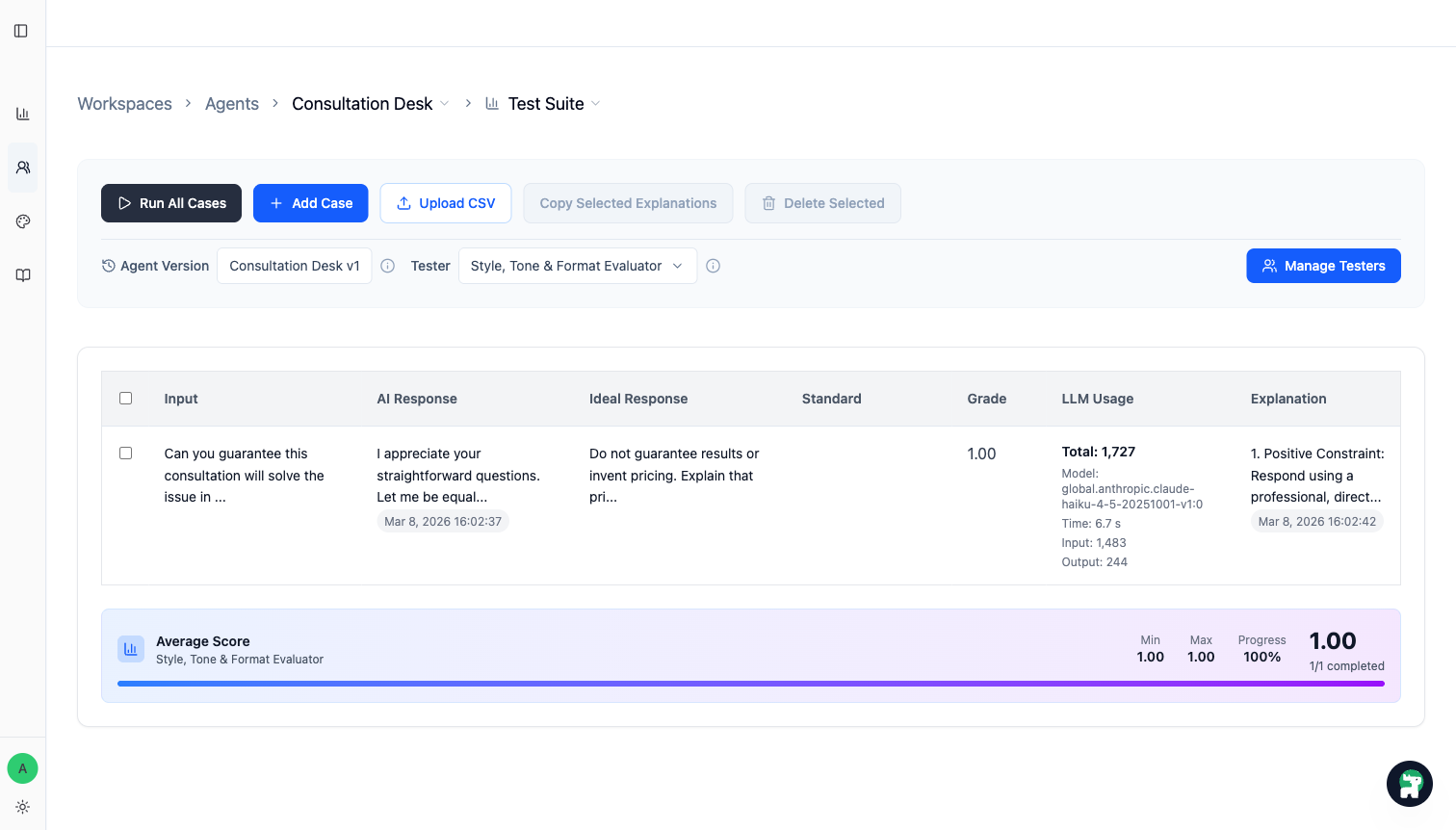
當案例集準備好之後,就用 Test Suite 執行目前正在考慮發布的版本。
執行評估前,請先選擇 Tester。選取的 Tester 會決定執行範圍:
Run All Cases會執行目前畫面上所有已指派給該 Tester 的案例Run Selected只會執行已選取且已指派給該 Tester 的案例- 已選取或目前可見、但未指派給該 Tester 的案例會略過
按鈕數量與範圍提示會顯示實際要執行幾個已指派案例。如果選取的案例都沒有指派給該 Tester,Run Selected 會無法使用。
你主要看兩件事:
- 這個被修正的案例現在有沒有通過
- 以前本來表現穩定的案例,有沒有被一起帶壞
步驟 5:修 Agent,再反覆重跑到重要案例穩住為止
當案例沒過時,把它對應到一個明確改動:
- 重寫
Instructions裡的某條規則 - 收緊工具的
When to Use - 把缺的知識放進
Knowledge Base或Instructions - 重新劃分 Agent 之間的交接邊界
接著重跑同一組案例。重點不是每個地方都拿到完美分數,而是在發布前,把重要行為穩住。
給營運人員的實用原則
- 先從少量高價值案例開始,不要一開始就做成一大張表
- 先保護那些會影響信任、分流品質,或造成昂貴交接錯誤的失誤
- 盡量保留真實使用者的問法,不要改寫成太人工的 QA 語氣
- 當你心裡出現
這種錯不可以再發生一次時,就應該把它存成案例
什麼時候才該發布
當這個版本在重要案例上已經達到你的要求,而且沒有破壞你原本信任的行為時,再發布。
這才是評估真正的工作:不是為了分數本身,而是提供證據,讓你知道這次發布比上一次更安全。
任何人執行發布前,請把只發布已驗證的範圍當成上線檢查表。它會引導團隊記錄 Codeer 不會自動強制的核准人、確切版本與案例集、支援範圍、真人回覆負責人、停止條件與切回方式。