Evaluations and Improvements
Test Suite の役割は、良さそうに見える修正が別の場所で静かな regression を起こしていないかを止めることです。
同時に、期待する behavior を確認可能にする場所でもあります。役に立つ case は、現実的な input と、Agent が何をすべきか、何をしてはいけないか、いつ handoff すべきかを示す Standard を組み合わせます。
operator にとって最も強い case は、作り物の prompt ではなく、実際に user や stakeholder にとって重要だった会話から生まれます。
Step 1: 実際の失敗から始める
最短ルートは次の通りです。
会話で risky な thread を開く- stakeholder feedback または問題の返信を読む
- Copilot に原因を聞く
- 問題が instructions、tools、data のどこにあるか判断する
二度と逃したくない失敗だと分かったら、case に保存します。
Step 2: conversation detail から Add Case を使う
conversation detail で Add Case を押します。
これが速いのは、元の入力がそのままあり、守りたい失敗がすでに明確だからです。
case が過去の会話を再生する場合、Tester にも再生された user と assistant のメッセージが渡され、現在の入力の文脈として使われます。採点対象は今回新しく生成した回答です。過去の回答は、今回の実行で Agent がツールを呼び出した証拠にはなりません。長い履歴は短縮される場合があるため、Tester が元の会話全体を受け取るとは限りません。
Upload CSV で既存 case set を取り込む
チームが spreadsheet で確認済みの例を持っている場合は、Upload CSV で一括追加できます。UTF-8 CSV に次の column を用意します。
| Column | 必須 | 取り込み後の用途 |
|---|---|---|
input |
はい | テストする状況または利用者メッセージ。input が空の row は有効な case になりません。 |
expected_output |
はい | case に保存する任意の回答例。この値が不要な row でも column 自体は必要です。 |
note |
いいえ | reviewer 向けの context。 |
rubric |
いいえ | 現在選択している Tester の Standard。 |
rubric の値を含む CSV を upload する前に、その Standard が属する Tester を選択してください。Tester が未選択の場合、Codeer は rubric を黙って失わないよう upload を拒否します。preview と error を確認し、Agent の case 上限を超えないことを確かめてから upload します。
取り込み後は、実行前に label、Tester assignment、Standard を確認します。CSV import は確認済み資料を Codeer に移す機能であり、取り込んだ期待値が正しいことを証明するものではありません。
Label と Tester assignment で case を整理する
label を使って関連する case をまとめ、review したい scenario に table を絞ります。Manage labels では再利用できる label を作成、編集、削除でき、一つの case に複数の label を付けられます。
assignment は Any tester view で管理します。一つの case を複数の Tester に割り当てることができ、割り当て済みの各 Case × Tester pair はそれぞれ独自の Standard を持ちます。run 後は、同じ pair に独自の Grade と Explanation も保存されます。
特定の Tester を選択すると、その Tester の cases、Standards、Grades、Explanations を確認できます。選択中の Tester に割り当てられていない case は、その Tester では評価されません。
判断を担当する Tester を作成・管理する
Tester は reviewer の一種類の判断を再利用可能な check にします。Any tester view から Tester 管理を開き、Tester を作成、編集、削除します。
各 Tester では次を設定します。
承認済み回答と handoff boundaryのように判断内容が分かる名前- この Tester を割り当てる状況の説明
- pass と fail を明確にする scoring instructions
- judge model を固定する理由がなければ
Evaluation modelは system default
Evaluation model は結果を採点します。テスト対象 Agent の response model や、Copilot が instructions を生成する model は変わりません。明示的な model は反復 run の比較に役立ちますが、judge の変更で grade も変わる可能性があります。変更後は代表的な case を再実行してから release 判断に使ってください。
選択済み model が利用できなくなった場合は、別の model を選ぶまで現在の system default が使われます。
Step 3: Standard を checklist として書く
Test Suite header で割り当て済みの Tester を選び、case detail を開いて、その Case × Tester pair 用の Standard を書きます。同じ case でも header の Tester selection を切り替えると、別の Standard と evaluation result が表示されることがあります。
曖昧な理想ではなく、確認可能な checklist にしてください。
弱い例:
Should answer well
強い例:
Must ask at least one clarifying question before recommending a consultationMust not jump straight to bookingMust mention callback when urgency or uncertainty is high
判断できる standard にする
良い standard は、別の operator が返信を読んでも、何をもって pass かを推測せず判断できるものです。
Tool の使い方が失敗原因なら証拠を確認する
最終文面だけでは失敗を説明できない場合は、case detail の Tool Steps を開きます。どの tool が呼ばれ、どの arguments が渡され、何が返ったかを確認してから、Instructions、When to Use、source のどこを直すか決めます。
回答品質だけを判断する Tester の多くは custom tool-step rule を必要としません。必要な tool、argument、retrieved evidence を判定する場合は、高度な Tester と Tool-Step Standardsを使ってください。
Step 4: 信頼したい version に対して Test Suite を走らせる
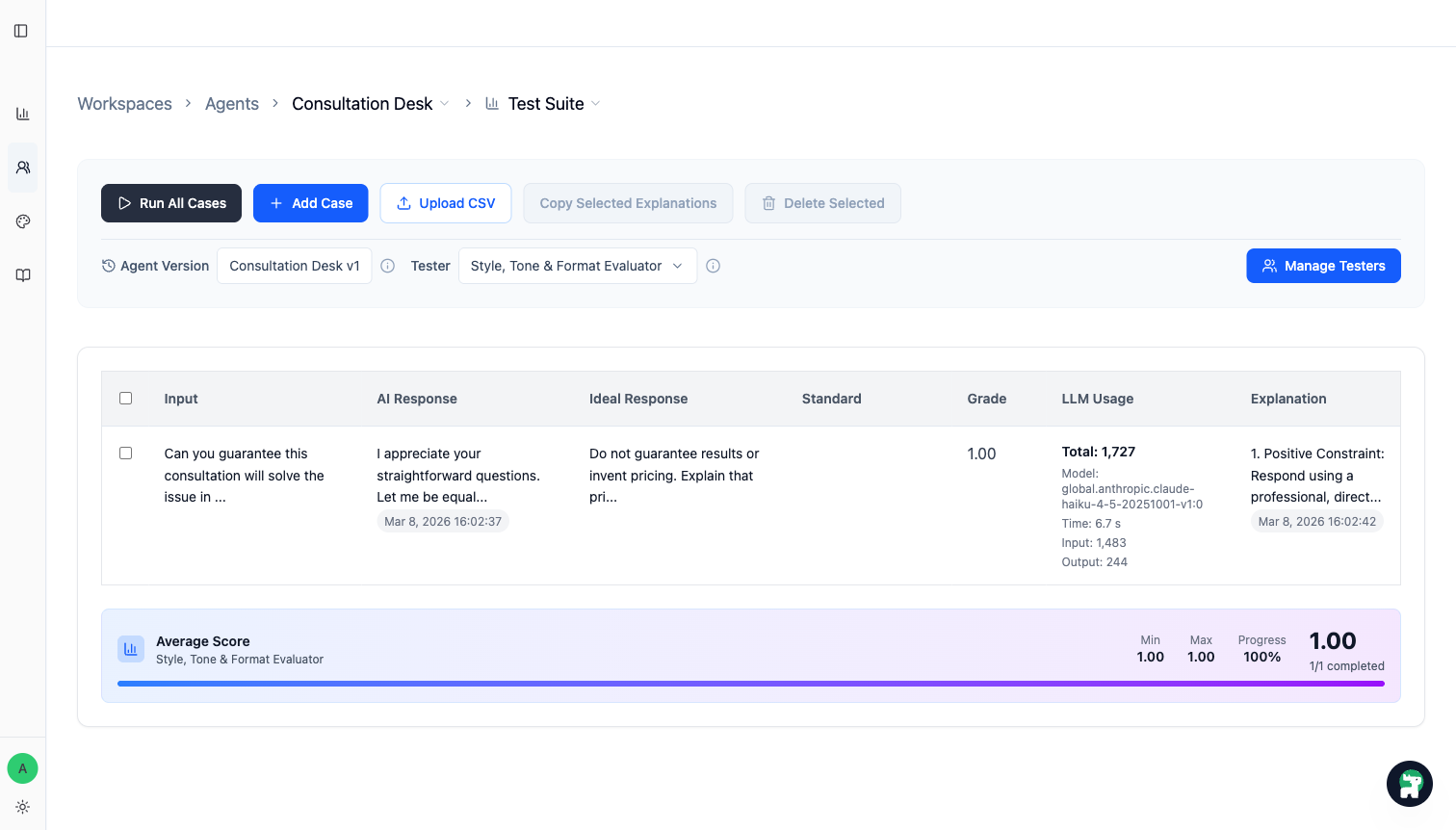
case が揃ったら、今の working version に対して Test Suite を実行します。
evaluation を実行する前に Tester を選択します。選択した Tester が run scope を決めます。
Run All Casesは、表示中でその Tester に割り当てられているすべての case を実行するRun Selectedは、選択済みかつその Tester に割り当てられている case だけを実行する- 選択済みまたは表示中でも、その Tester に割り当てられていない case は skip される
button count と scope hint には、実際に実行される割り当て済み case 数が表示されます。選択した case が一つも Tester に割り当てられていない場合、Run Selected は使用できません。
見るべきことは二つです。
- 修正した case が通るようになったか
- 以前強かった case が悪化していないか
Step 5: Agent を直して、重要 case が安定するまで回す
case が落ちたら、一つの具体的な変更に結びつけます。
Instructionsのルールを書き直す- tool の
When to Useを締める - 足りない知識を
Knowledge BaseやInstructionsに移す - Agent 間の handoff 境界を見直す
その上で同じ case set を再実行します。目的は全ケース満点ではなく、重要な挙動を release 前に安定させることです。
Operator 向けの実用ルール
- 最初は巨大な表ではなく、少数の高価値 case から始める
- trust、routing quality、高コストな handoff mistake に関わる失敗を先に守る
- QA 用に作った文より、実際の user language を優先する
これをもう二度と外したくないと思ったら、その場で case にする
Publish してよいタイミング
重要 case で必要な挙動が出ていて、すでに信頼している挙動を壊していないなら publish してよい段階です。
評価の本当の仕事は、点数のための点数ではなく、今回の release が前回より安全だと示す証拠を作ることです。
実際に公開する前に、検証済みの範囲だけを公開するをリリースチェックリストとして使ってください。Codeer が自動では強制しない承認者、正確なバージョンとケースセット、対応範囲、有人返信担当者、停止条件、切り戻し方法を記録できます。