Collect Feedback
Real quality work starts after the channel is live.
The goal is not to make stakeholders diagnose the agent. The goal is to let them point at the exact message that felt wrong, then let the operator and Copilot do the structured follow-up.
Step 1: Ask stakeholders to leave feedback on the exact reply
In the published web client, the stakeholder can click Improve directly on the agent message that needs work.
They do not need to explain the root cause. A short natural-language comment is enough, such as:
This is too generic.It should recommend a callback sooner.It missed the difference between first visit and follow-up.
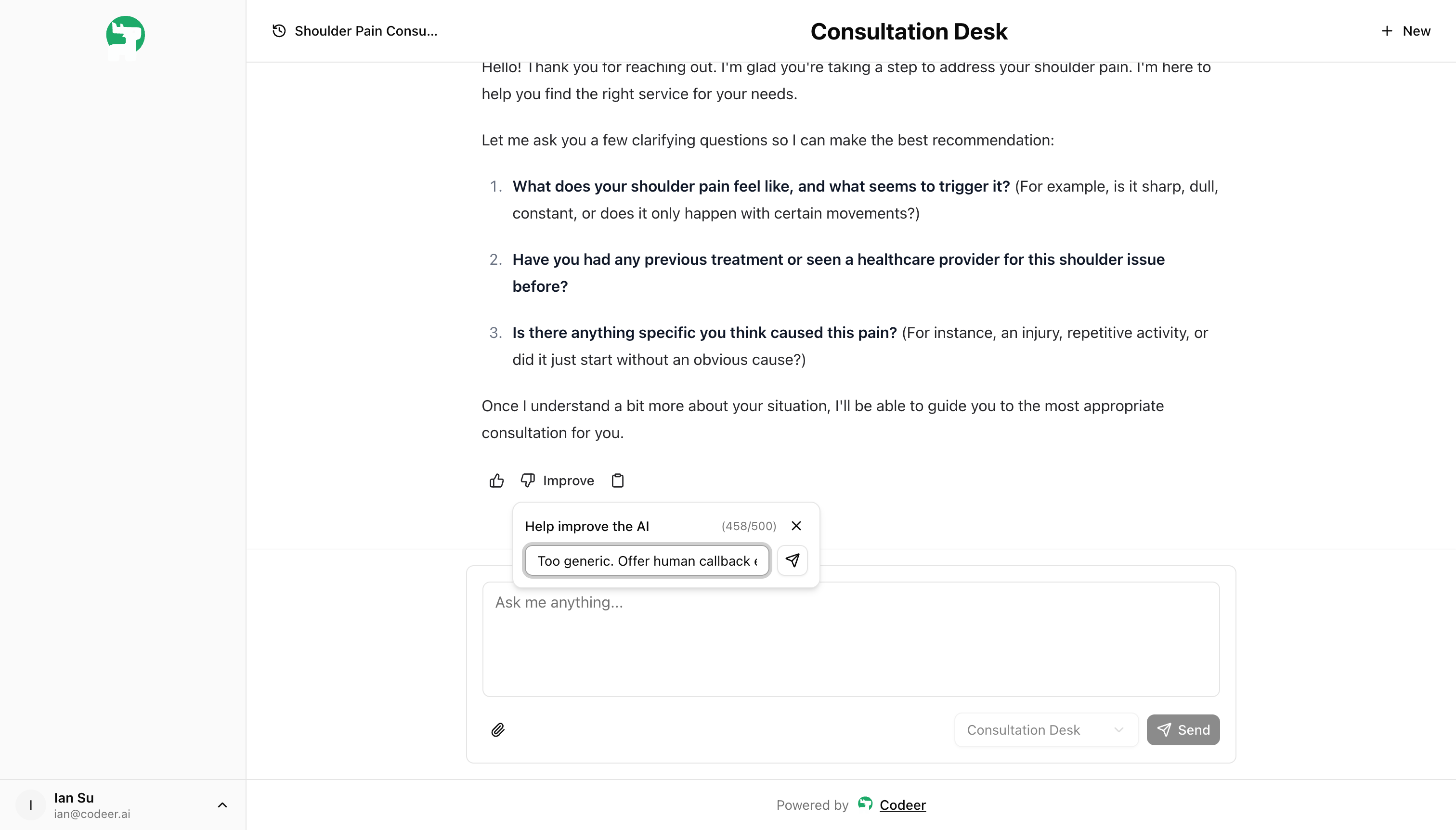
Positive feedback still helps, but Improve is what creates the most actionable trail for operators.
Step 2: Review the feedback record in Conversations
Once feedback is submitted, open Conversations and inspect the same thread in context.
You are looking for:
- the exact user request
- the exact reply that triggered the feedback
- the stakeholder comment
- whether this looks like a one-off miss or a pattern worth protecting
Step 3: Ask Copilot from the conversation detail
From the conversation detail, open Copilot and ask what likely caused the behavior.
This is usually the fastest way to separate:
- an instruction problem
- a tool trigger problem
- a knowledge gap
- a long-thread consistency problem
Step 4: Fix the agent, then protect the case
After you update the agent and confirm the fix works, go back to the same conversation detail and click Add Case.
That turns the risky conversation into something you can keep testing in Test Suite.
What good stakeholder feedback looks like
Ask stakeholders for comments that are:
- attached to the exact reply
- short and concrete
- written from their point of view, not as prompt-engineering instructions
Good examples:
This answer sounds too certain.I still don't know which consultation to choose.It should have asked one more clarifying question before recommending anything.