Memory
Use Memory when the agent should remember stable, user-confirmed context across future conversations.
For the Consultation Desk example, memory is useful for preferences such as the user's language, preferred contact method, or whether they usually prefer a callback over self-service. It is not the right place for sensitive details or one-time intake notes.
Good Uses of Memory
- Preferred language
- Preferred contact method
- Stable formatting preferences
- Repeat workflow preferences that help future conversations start faster
Bad Uses of Memory
- Passwords, secrets, or access tokens
- Sensitive details that should not persist casually
- Temporary scheduling notes
- Long free-text conversation summaries that will go stale quickly
Step 1: Add Memory
In Editor, open Tools, click Add Tool, and choose Memory.
Only one memory tool can be added to each agent.
Step 2: Tell the Agent What It May Store
The best memory instructions are narrow and explicit.
Example:
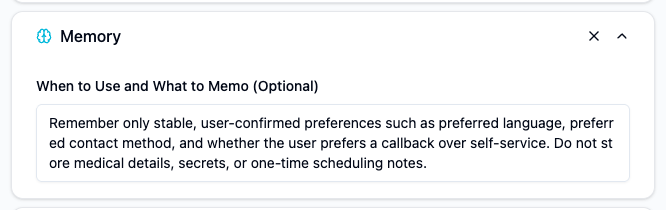
Remember only stable, user-confirmed preferences such as preferred language, preferred contact method, and whether the user prefers a callback over self-service. Do not store medical details, secrets, or one-time scheduling notes.
This tells the agent both:
- what is safe to remember
- what must never be stored
Step 3: Test Reuse Across Conversations
Check whether the agent:
- stores the right kind of preference
- reuses it helpfully later
- avoids storing temporary or sensitive information
If memory starts feeling noisy, the rule is too broad.
Operator Tips
- Treat memory as a small profile, not a second history log.
- Store only facts that the user would expect the agent to remember later.
- If the fact matters only inside one conversation, keep it in the thread, not in memory.
- Review memory behavior with real histories when the agent starts feeling overconfident or overly personalized.
Memory depends on an end user context
Memory is most useful when the conversation is tied to a real user identity over time. If the experience is anonymous or short-lived, the value of memory will usually be limited.
How Memory behaves per channel
Memory only works when the platform gives the agent a stable identity for the user. Here is how that plays out for each channel:
| Channel | Does Memory work? | What you need |
|---|---|---|
| Web Client | Works for a limited time via cookies / local storage, and is fully stable once the user signs in. Clearing the browser, switching device, or entering a private window resets the anonymous identity. | For flows where Memory must be reliable, require sign-in (Customers / whitelist). |
| Web Widget | Same as Web Client by default (cookie / local storage). Most robust when you pass User_ID yourself at widget initialization so the identity survives cache clears and device changes. |
Pass your product's user identifier when initializing the widget whenever Memory matters. |
| LINE | Yes, always. Every LINE user has a stable LINE ID, so Memory works out of the box. | Nothing extra. |
| Slack | Yes, always — Slack users are resolved by email, which is stable. | See the caveat below. |
Slack does not support multi-user threads
Slack currently treats the whole conversation as belonging to the first user who interacted with the agent. If a second person joins the same thread, their messages are attributed to the first user — so Memory, history, and audience access all apply to that first user. Plan agent rollouts accordingly (for example, prefer DMs over shared channels when Memory matters).