Knowledge Base
Knowledge Base is where you prepare reference material so the agent can retrieve it cleanly later.
The main job here is not just uploading files. It is deciding which material is focused enough to help the agent make better decisions.
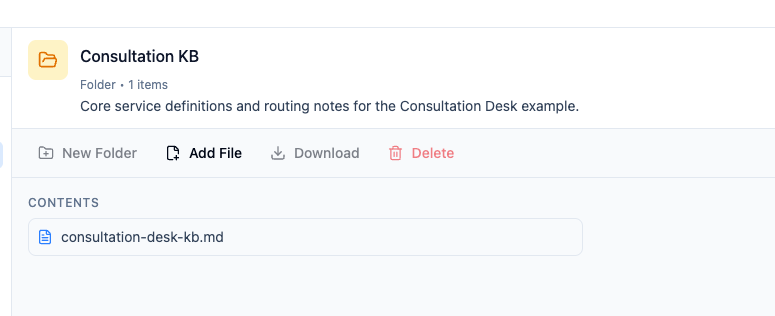
What belongs in a good folder
For Consultation Desk, strong folders are usually narrow and purposeful.
Good examples:
- service definitions
- routing rules
- callback and handoff expectations
- short policy references that are still too long for
Instructions
Weak examples:
- raw interview transcripts
- giant mixed folders with unrelated content
- outdated duplicates from several different owners
Choose the right home before you connect the file
The same document does not belong everywhere.
| If the file should... | Best home |
|---|---|
| Be followed every turn | Instructions |
| Be searched only when relevant | Knowledge Base |
| Be used only after it is cleaned up | Keep it out for now |
Build the folder around operator questions
Instead of asking, What files do we have?, ask:
- What questions should the agent answer more reliably?
- What decisions should it make more consistently?
- What references should a human operator trust the agent to cite?
That leads to better folders than uploading everything you can find.
Connect the folder to the agent
After the data is prepared, add it through the Knowledge Base tool in the agent editor.
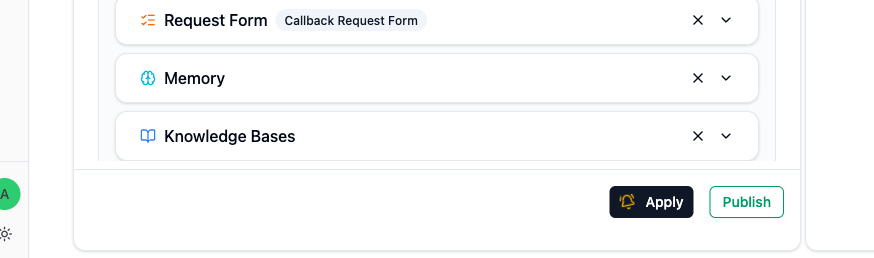
The handoff is:
- prepare the folder here
- select it in
Tools - write a clear
When to Use - test with real questions
Supported sources and file types
Use this table before preparing a source. The file extension must match one of the accepted formats.
| Add from | Accepted items | Important note |
|---|---|---|
| Direct upload — documents | .pdf, .txt, .md, .html, .doc, .docx, .pptx |
Complex layouts and presentation behavior may not be preserved exactly. |
| Direct upload — tabular data | .csv, .xlsx |
Each CSV becomes one table; each visible XLSX worksheet becomes one table. |
| Direct upload — images | .jpg, .jpeg, .png, .gif, .webp |
The original image is kept and an AI search description is created. |
| Google Drive | Google Docs, Google Slides, Google Sheets, PDF, TXT, Markdown, DOC, DOCX, PPTX | Upload XLSX directly; do not select it from Google Drive. |
| Notion | Pages within the OAuth access you granted | Page attachments, database properties, embedded media, and OCR are not separately guaranteed. |
Audio files are not accepted in Knowledge Base. Audio can be attached in supported chat flows when the selected model accepts audio input; see LLM Model Selection. See Images in Knowledge Base for how standalone and embedded images are handled.
Limits and processing behavior
- Direct uploads have a maximum size of 50 MB per file, and you can select up to 50 files at once.
- Uploaded or imported content must finish processing before the agent can retrieve it. Use the file status in Knowledge Base to confirm that it is ready.
- Supported documents are converted into searchable content. Complex layout or presentation behavior may not be preserved exactly.
- Google Drive documents are connected copies. If the source changes, refresh the connected copy instead of assuming it updates automatically. Google Sheets also checks for a newer source version when queried as tabular data.
- The Notion flow imports pages within the authorized OAuth scope. It does not promise separate import or OCR support for page attachments, database properties, or embedded media.
Work with CSV, XLSX, and Google Sheets
Tabular sources include schema details that ordinary documents do not have. Open a ready source to review its tables, row counts, columns, inferred types, and warnings before connecting it to an agent.
- A CSV file becomes one table.
- Each visible XLSX worksheet becomes one table.
- Each visible Google Sheets tab becomes one table.
- CSV and XLSX sources can be replaced with a file of the same format.
- Google Sheets sources can be refreshed from the connected file.
- If processing fails, correct the source or access problem and retry.
Let the agent discover relevant tables automatically
When a ready tabular source is included in an agent's configured Knowledge Base, the agent can automatically find a relevant table for exact row lookups, filters, sorting, counts, or calculations. A single clear match is queried directly; if several tables are plausible, the agent asks the user to choose before continuing.
Do not add an explicit Tabular Data Tool when you want this automatic behavior. Once the agent has any explicit Tabular Data Tool, it only uses the sources selected in those tools and does not automatically search other tables in its Knowledge Base.
Older tabular sources
Sources added before automatic discovery was available may need to be processed again. If an older source is not found, replace the CSV or XLSX, refresh the Google Sheet, or import it again. Existing explicit tool connections and ordinary Knowledge Base search are not affected.
See Tabular Data Tool to compare automatic discovery with an explicitly fixed source.
Add FAQ annotations to important passages
Use an FAQ annotation when a passage is correct but users are likely to ask for it in different words. The annotation adds a likely question or keyword to the selected passage so the agent can retrieve it more reliably; it does not rewrite the source.
- Open a text-based file after its status becomes
Ready. - Select the exact passage that answers the question.
- Choose Add FAQ for selected text.
- Enter one natural user question or a distinctive keyword, then save.
Use the side panel or numbered marker to edit or delete an annotation. Deleting it removes only the trigger question; the document text stays unchanged.
Keep each annotation specific. If the answer has changed, update the source first instead of using an annotation to contradict outdated content.
File names matter
The agent sees each file's name as a signal, and retrieval quality drops fast when the names are generic. Treat filenames as short, self-describing labels:
- Good:
consultation-routing-rules-2026.md,callback-escalation-policy.md,pricing-enterprise-tier.pdf - Weak:
final_v3.docx,doc1.pdf,Untitled.md,export.csv
A descriptive name helps the agent pick the right file, helps operators spot stale duplicates, and makes it easier to cite sources when the agent answers.
Images in Knowledge Base
When you upload a standalone image, Knowledge Base retains the original image and creates a read-only AI search description for semantic retrieval. The image is shown first in the file view, with the generated description available as supporting metadata.
After the image reaches Ready, an agent with both Knowledge Base and Image Generation configured can also use it as a visual reference for a new image. You may be able to preview an image while it is still processing, but it cannot be used as a generation reference until processing finishes.
Images inside other KB files (for example, diagrams or screenshots embedded in a Markdown or PDF reference) are also retrievable. The agent can surface an image in its reply by emitting standard Markdown image syntax — the chat surface will render it inline:

If you want the agent to show a specific diagram, tell it so in Instructions or in the Knowledge Base tool's When to Use (for example: When the user asks about routing, show the routing diagram using Markdown image syntax). Without that hint, the agent may describe the image in words instead of showing it.
Keep the source clean
A few practical habits help a lot:
- prefer concise reference files over giant exports
- remove stale duplicates
- split very different topics into separate folders when the agent should use them differently
- do not upload raw transcripts when a distilled summary would be stronger
When the source changes
If the original file changes in a meaningful way, refresh the connected copy on purpose. Do not assume the agent is already seeing the newest version.