Knowledge Base
Use Knowledge Base when your agent needs stable reference material that is too large or too changeable to keep directly inside Instructions.
For the Consultation Desk example, the knowledge base is a good place for service definitions, routing rules, intake notes, and handoff expectations that should stay consistent across conversations.
For the canonical source list, supported file types, the 50 MB per-file direct-upload limit, and processing behavior, see Supported sources and file types.
Choose the Right Storage
Use this quick rule:
| If the knowledge is... | Put it here |
|---|---|
| Small and must apply every turn | Instructions |
| Reference material that should be searched when relevant | Knowledge Base |
| Exact rows, filters, sorting, or calculations from a CSV, XLSX workbook, or Google Sheet | Automatic discovery through Knowledge Base, or Tabular Data Tool when the source must stay fixed |
| The latest public information outside your workspace | Web Search |
Step 1: Prepare a Focused Folder
Before you add the tool, create or reuse a folder that contains only the material this agent should search.
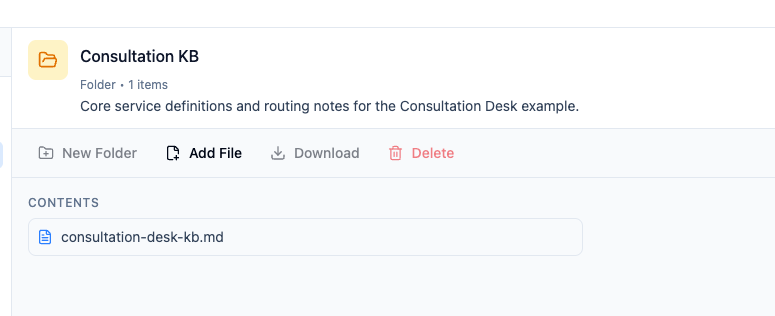
Good knowledge base material is:
- Narrow enough to retrieve cleanly
- Written around one domain or use case
- Easy for the operator to maintain
Avoid uploading loose, noisy source material when a condensed version would work better.
Step 2: Add Knowledge Bases in the Agent Editor
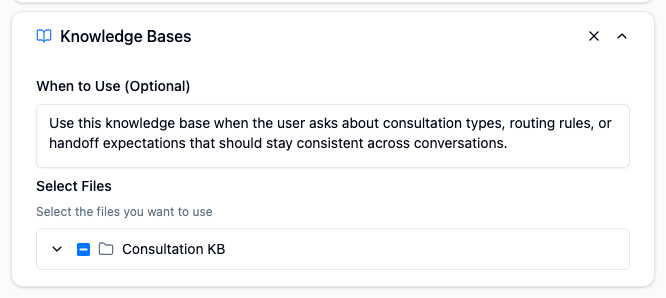
In Editor, open Tools, click Add Tool, choose Knowledge Bases, then select the folder or files the agent should search.
Knowledge Base is workspace-scoped
The agent can only use knowledge that exists in the same workspace. If the folder is missing from the picker, check whether the content was created in another workspace or whether the folder is still empty.
Automatic discovery of tabular data
If the selected Knowledge Base contains ready CSV, XLSX, or Google Sheets sources and the agent has no explicit Tabular Data Tool, it can automatically find and query a relevant table. When several tables are plausible, it asks the user to confirm a choice.
Use an explicit Tabular Data Tool when the source must be fixed and predictable. Adding any explicit tabular tool disables automatic discovery for that agent, so it will not fall back to other tables in the Knowledge Base.
Step 3: Write a Narrow When to Use
Tell the agent exactly when it should search this material.
Example:
Use this knowledge base when the user asks about consultation types, routing rules, or handoff expectations that should stay consistent across conversations.
This works better than a vague instruction such as:
Use the knowledge base when needed.
Step 4: Test Retrieval in Live Test
Test with prompts that should clearly trigger the knowledge base.
Examples:
What is the difference between the Initial Consultation and the Specialist Consultation?When should Consultation Desk recommend a human callback instead of choosing a consultation directly?
Check for two things:
- The agent actually uses the knowledge base
- The answer stays faithful to the source material instead of improvising
Operator Tips
- Split folders by use case when it improves retrieval quality.
- Keep each folder focused. One clean folder is better than one giant mixed dump.
- If a rule must apply on every turn, it usually belongs in
Instructions, not only inKnowledge Base. - After you update important source files, retest the agent with real examples.
Common Mistakes
Putting every document into one folder
This makes retrieval noisier and harder to debug.
Using Knowledge Base for live information
If the answer depends on what changed today, use Web Search instead.
Using document retrieval for exact table calculations
If an answer depends on exact rows, filters, sorting, counts, or aggregates, keep the ready table in the agent's configured Knowledge Base for automatic discovery. Use an explicit Tabular Data Tool only when the source must stay fixed.
Hiding core rules only inside files
If the agent must follow a rule every time, keep that rule in Instructions too.