Web Search
Use Web Search when the agent needs the latest public information. Do not use it as a substitute for your own stable knowledge.
For the Consultation Desk example, Web Search is not the default path. It is the fallback when a user explicitly needs current public guidance and the answer should come from trusted external sources.
When Web Search Is the Right Tool
Use it when:
- The user asks for the latest public information
- The answer depends on something that may have changed recently
- The information lives outside your workspace and should not be copied into your own knowledge base
Do not use it when:
- The answer should come from your own SOPs, policies, or service definitions
- You need consistent internal wording
- The information should be reviewed and maintained by your team
Step 1: Add Web Search
In Editor, open Tools, click Add Tool, and choose Web Search.
Step 2: Restrict Domains When You Can
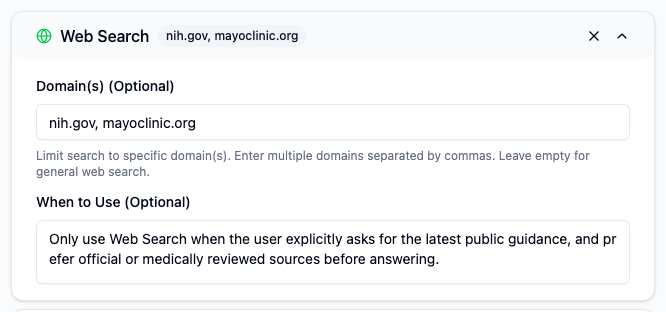
If the agent should rely on a known set of sources, enter them in Domain(s).
For the Consultation Desk example, the operator limited search to trusted public sources instead of letting the agent search the whole web.
That gives you:
- Cleaner retrieval
- More predictable answers
- Easier debugging when something goes wrong
Leave domains empty only when broad search is genuinely necessary.
Step 3: Write a Strict When to Use
Your instruction should make Web Search a deliberate choice, not a reflex.
Example:
Only use Web Search when the user explicitly asks for the latest public guidance, and prefer official or medically reviewed sources before answering.
This does two jobs:
- It tells the agent when to search
- It tells the agent what kind of sources to prefer
Step 4: Test with a Real Current-Info Prompt
Use prompts that clearly require fresh information.
Examples:
Can you check the latest public guidance on this issue?Has the official recommendation changed recently?
Then verify:
- The tool was actually called
- The answer reflects the intended source quality
- The agent did not use
Web Searchfor a question your own knowledge base should have handled
Operator Tips
- Prefer official, primary, or highly trusted domains.
- Mention sources in the answer when the user would benefit from verification.
- Keep the trigger narrow so the agent does not search for routine questions.
- If the answer should remain stable for most conversations, move it into
Knowledge Baseinstead of searching for it every time.
Common Mistakes
Letting Web Search replace internal knowledge
This usually makes answers slower and less consistent.
Using broad search for high-stakes answers
If the answer matters, constrain the domains.
Writing a vague trigger
Use web search when helpful is too loose. The agent needs a real decision rule.