Collect Feedback
After publishing your Web Client, users can provide feedback directly in the chat interface, helping you understand your Agent's performance and continuously improve it.
Why Collecting Feedback is Important
Real user feedback is the most valuable resource for improving your Agent. Through feedback, you can:
- Discover areas where the Agent's responses are unsatisfactory
- Understand users' actual needs and expectations
- Continuously optimize the Agent's performance
Each cycle of publish → feedback → improvement makes your Agent more mature and confident to face a larger audience.
User Side: Providing Feedback
Providing Feedback in the Chat Interface
When using the Web Client, users can see feedback options below each AI response.
Positive Feedback (Helpful)
If the response is helpful, users can click the 👍 button to express satisfaction:
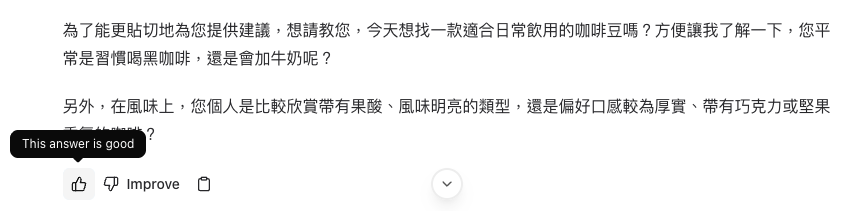
After clicking, the system will record that this response received positive feedback.
Improvement Feedback
If the response needs improvement, users can click the "Improve" button:

After clicking "Improve", a feedback form will pop up:
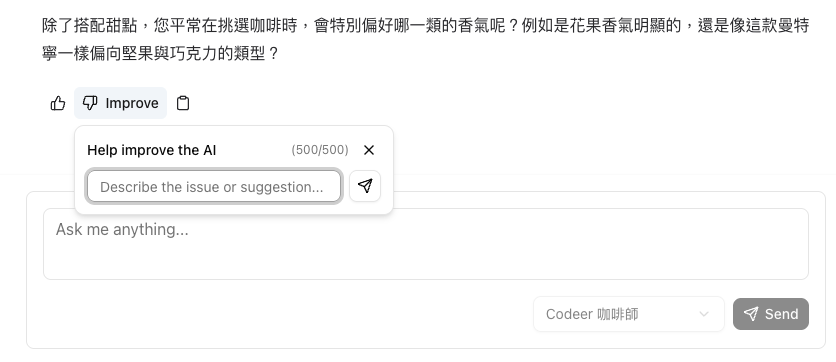
Users can:
- Describe problems or suggestions: Explain in detail what needs improvement (up to 500 characters)
- Explain desired improvements: Provide specific improvement directions
Tip
Encourage users to provide specific feedback, such as "response too long", "answer not accurate enough", "hope to provide more examples", etc., which is more helpful for improvement.
Feedback Limitation
Each message can only receive one feedback. If a user has already provided feedback on a response, they cannot provide it again.
Admin Side: Viewing Feedback
Viewing Feedback in History
After publishing, you can view all user feedback in the admin panel:
- Enter your workspace
- Click the "History" tab
- In the history list, you can see the feedback status for each conversation
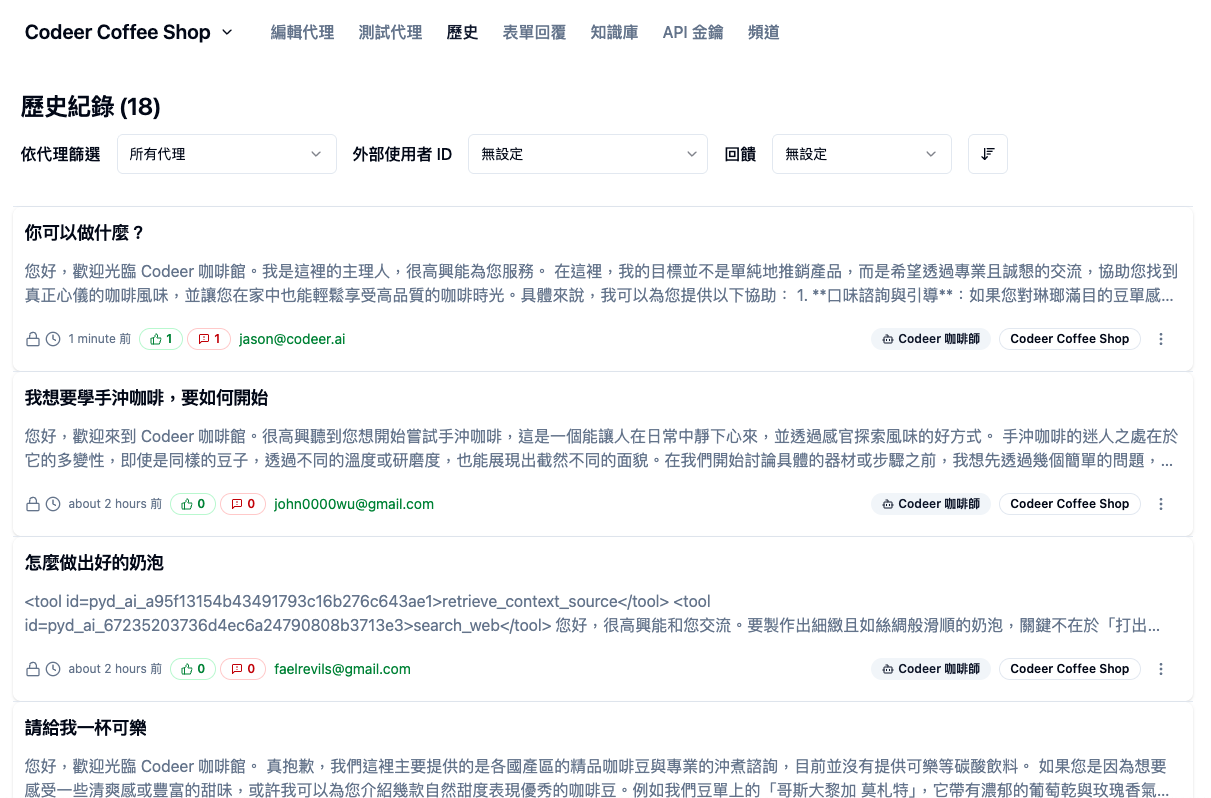
In the list, you can see:
- 👍 Icon: Indicates positive feedback
- 🚩 Icon: Indicates improvement feedback
- Feedback Count: Shows the number of feedback received for that conversation
View Feedback Details
Click on a conversation record with feedback to view the complete feedback content.
Positive Feedback Details
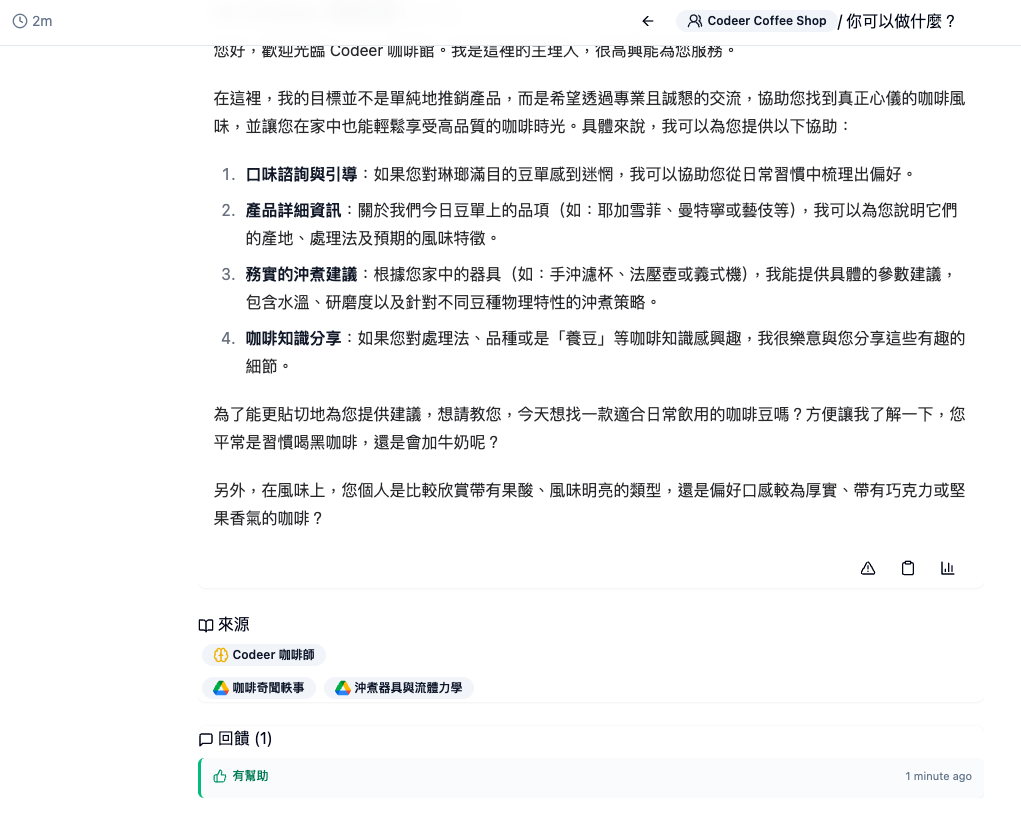
On the conversation details page, you can see:
- Complete conversation content
- Time when the user clicked "Helpful"
- Feedback user information (if the user is logged in)
Improvement Feedback Details
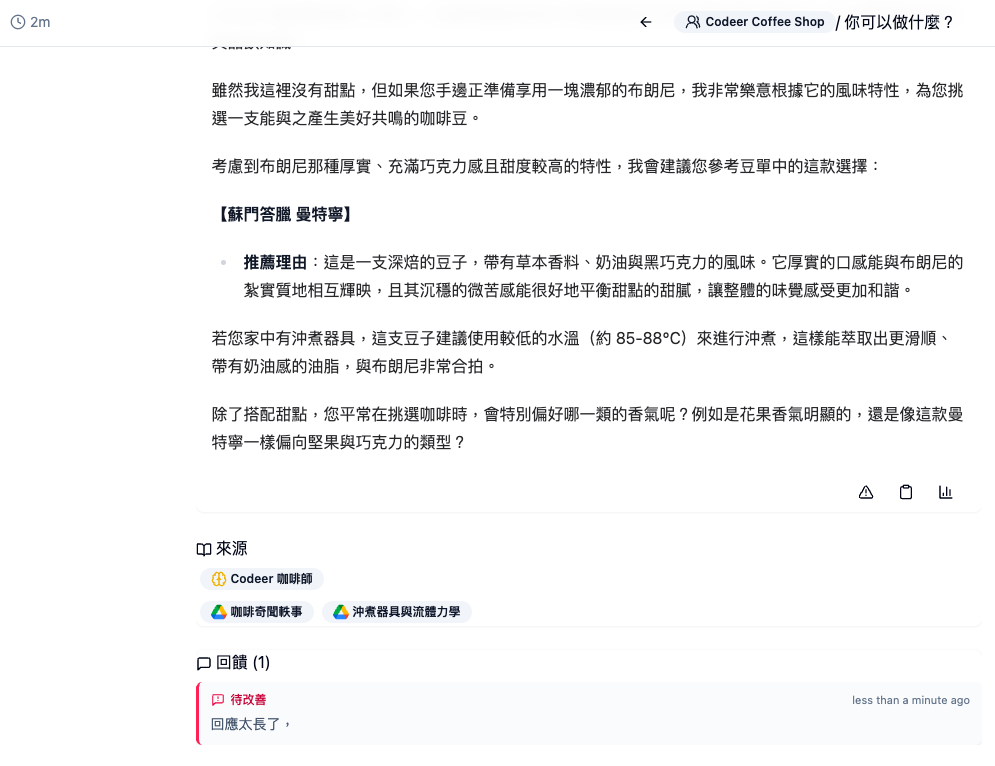
For improvement feedback, you can see:
- Complete conversation content
- Feedback text filled in by the user
- Feedback time
- Feedback user information (if the user is logged in)
Filter Feedback
In the filter bar on the history page, you can:
- Select "Feedback" filter criteria
- View all conversations with feedback
- View positive feedback or improvement feedback separately
This allows you to quickly find conversations that need improvement and prioritize them.
Using Feedback to Improve Your Agent
After collecting feedback, the recommended improvement process:
-
Analyze Feedback Patterns: Identify common feedback types
- What issues are frequently mentioned?
- What response styles do users dislike?
- What information do users find insufficient?
-
Build Test Cases: Transform issues into Eval Cases
- Record user questions and expected responses
- Use as validation standards for future improvements
-
Adjust Agent: Modify Instructions or tool settings
- Adjust response style based on feedback
- Supplement missing information sources
- Optimize response length and structure
-
Verify Improvements: Validate improvement effects through Live Test
- Test similar questions
- Confirm improvements meet expectations
-
Republish: Republish to users after improvements
- Continue collecting new feedback
- Form a continuous improvement cycle
→ Learn more: Confident Iteration
FAQ
Can users provide feedback anonymously?
No. Users must log in with their own account to use the Agent and provide feedback.
How long is feedback saved?
Feedback is permanently saved in the history for you to view and analyze at any time.
Can I export feedback data?
Currently, feedback data is displayed in the history, which you can manually view and analyze. Export functionality may be provided in the future.
How to encourage users to provide feedback?
We recommend including a friendly reminder in the Agent's introduction or welcome message that users can provide feedback to help improve service quality.
Does feedback affect the Agent's responses?
No. Feedback is only used for recording and analysis and does not immediately affect the Agent's responses. You need to manually adjust the Agent's settings based on feedback.